 TabTasker
Encryption is the core security mechanism that transforms PDF content into unreadable cipher text, making it inaccessible to anyone without the correct credentials. The role of encryption in PDF editing goes beyond simple password protection. It governs who can open a file, who can modify it, and whether any changes made are legitimate. Tools like Adobe Acrobat and PDF-Tools SDK implement encryption standards that align with ISO 32000-2, the specification governing modern PDF security. Understanding how these layers work together is the difference between a document that is genuinely protected and one that only appears to be.
How does encryption protect PDF content during editing?
PDF encryption protects confidentiality by encrypting the document’s content streams, which means the raw text, images, and metadata inside a PDF are scrambled into unreadable data until the correct password is supplied. Without the right credentials, no PDF viewer can render the content, and no editing tool can access it. This is the hard boundary that separates encryption from softer controls.
There are two distinct password types in a standard encrypted PDF, and confusing them is one of the most common mistakes professionals make:
-
User password (open password): Required to open and decrypt the file. Without it, the document cannot be read or edited at all.
-
Owner password (permissions password): Controls what actions are permitted after the file is opened, such as printing, copying text, or making edits. It does not encrypt the content itself.
-
Encryption dictionary: The PDF stores the document encryption key, encrypted separately under both the user and owner passwords, enabling these two roles to function independently.
-
Viewer behavior: PDF viewers prompt for a password before displaying any content when a user password is set. Permissions restrictions only appear after the file is already open.
When you open an encrypted PDF in Adobe Acrobat and are prompted for a password before seeing any content, that is the user password at work. If you open a PDF freely but find that the “Edit” button is grayed out, that is a permissions restriction, not encryption.
Pro Tip: Check a PDF’s security status in Adobe Acrobat by going to File > Properties > Security. This tab shows whether the document is encrypted and which permissions are active, so you know exactly what protections are in place before you attempt any edits.
What encryption methods are used in PDFs?
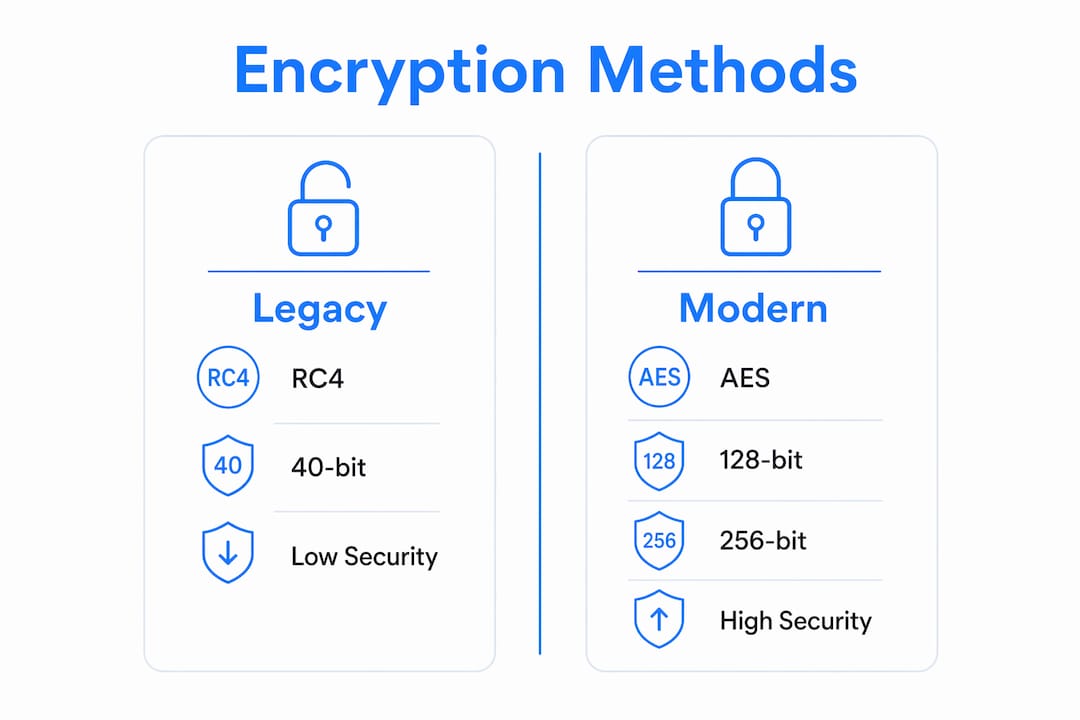
Not all encryption is equal, and the algorithm protecting your PDF matters as much as the password itself. The PDF format has supported multiple encryption standards over its history, and the differences in their strength are significant.

| Encryption method | Algorithm | Security level | PDF version |
|---|---|---|---|
| Legacy RC4 (40-bit) | RC4 | Weak, easily broken | PDF 1.1 to 1.3 |
| RC4 (128-bit) | RC4 | Moderate, outdated | PDF 1.4 to 1.6 |
| AES-128 | AES | Good | PDF 1.6 to 1.7 |
| AES-256 | AES | Strong, recommended | PDF 1.7 ext. / PDF 2.0 |
AES-256 is the strongest widely available encryption algorithm for PDF security, and it aligns with the PDF 2.0 standard defined in ISO 32000-2. Legacy RC4 encryption, once common in older PDF workflows, is now considered cryptographically weak and should not be used for any document containing sensitive information. The practical implication is straightforward: if you are editing a PDF that was encrypted with RC4, the encryption protecting that document can be broken with modern computing resources.
Certificate-based encryption takes security a step further. Rather than relying on a shared password, certificate-based encryption uses public-key cryptography, meaning only the holder of a designated private key can decrypt and access the document. This approach is closely tied to digital certificate infrastructure and is common in regulated industries like healthcare and legal services, where proving identity matters as much as protecting content.
Pro Tip: When creating or editing a sensitive PDF, always verify the encryption algorithm in use. In Adobe Acrobat, the Security Properties dialog shows the encryption level. If it reads RC4, re-save the document with AES-256 before distributing it.
How do encryption and permissions differ and work together?
This is where many professionals get caught off guard. Encryption and permissions are not the same thing, but they are designed to work as a pair. Understanding the distinction is critical for anyone managing secure PDF editing in a professional context.
Encryption controls who can open and decrypt the PDF. Permissions control what an authorized user can do after the file is open. These are fundamentally different security layers, and treating them as interchangeable creates real vulnerabilities.
Here is why permissions alone are not enough:
-
Permissions rely on viewer compliance. A PDF reader that respects the permissions standard will block printing or editing as instructed. A non-compliant tool or a custom script may ignore those restrictions entirely.
-
Without encryption, permissions can be bypassed by software that does not enforce the PDF specification. The owner password controls permissions but does not encrypt content, making it a soft boundary rather than a hard one.
-
Encryption is the hard security boundary. It does not matter whether a tool respects permissions or not. If the content is encrypted and the user does not have the decryption key, the content is inaccessible.
-
Combined, they form a layered model. Encryption prevents unauthorized access. Permissions define the scope of authorized use. Together, they address both who gets in and what they can do once inside.
For enterprise document governance, this layered model is not optional. A legal firm sending a contract for review might encrypt the document so only the recipient can open it, then set permissions to allow annotation but block printing or copying. Neither control alone achieves both goals.
What additional measures enhance security beyond encryption?
Encryption secures access. It does not, by itself, confirm that a document has not been altered after it was authorized. That is where integrity controls come in, and they are the part of PDF security that most people overlook entirely.
The most significant integrity mechanism in the PDF standard is the Modification Detection and Prevention signature, commonly called an MDP signature or certified digital signature. Here is how a layered security workflow using MDP signatures operates in practice:
-
Author certifies the document. The document creator applies an MDP signature, which records a cryptographic hash of the document’s current state.
-
Permitted edits are defined. The MDP signature specifies what types of changes are allowed without invalidating the certification. Common allowances include form filling and annotation.
-
Recipient makes allowed edits. MDP signatures allow specific modifications like form filling without invalidating the document signature, preserving the document’s certified status.
-
Unauthorized changes break the signature. If anyone modifies content outside the permitted scope, the MDP signature is invalidated, and any compliant PDF viewer will flag the document as altered.
-
Audit logs capture the full history. In enterprise workflows, document tracking systems record who accessed the file, when, and what changes were made, creating an accountability trail that encryption alone cannot provide.
Encryption alone does not confirm unaltered content. A document can be decrypted, modified, re-encrypted, and redistributed without any visible sign of tampering unless an integrity control like an MDP signature is in place. For regulated industries, this distinction is not academic. It is the difference between a document that is legally defensible and one that is not.
Enterprise PDF security requires a layered approach: encryption plus permission controls plus audit logs. Passwords alone are insufficient for organizations that need to demonstrate both confidentiality and accountability. The best practice for editing sensitive PDFs is to combine AES-256 encryption with a strong user password, set permissions appropriate to the recipient’s role, apply an MDP signature if document integrity must be preserved, and use strong, unique passwords for every document rather than reusing credentials across files.
Key takeaways
Encryption is the non-negotiable foundation of PDF security, and permissions, integrity signatures, and audit logs are the layers that make it complete.
| Point | Details |
|---|---|
| Encryption is the hard boundary | AES-256 encryption prevents access entirely; permissions alone can be bypassed by non-compliant tools. |
| Two passwords serve different roles | The user password decrypts the file; the owner password only controls permitted actions after opening. |
| AES-256 is the current standard | RC4 encryption is cryptographically weak and should be replaced in any sensitive PDF workflow. |
| MDP signatures protect integrity | Certified signatures detect unauthorized edits even after a document has been decrypted and re-encrypted. |
| Layered security is required | Combining encryption, permissions, and audit logs addresses access, usage, and accountability together. |
Why most people misread PDF security
I have reviewed a lot of document workflows over the years, and the same misunderstanding comes up repeatedly: people treat a permissions password as equivalent to encryption. They set an owner password, see that editing is blocked in their PDF reader, and assume the document is protected. It is not. That restriction exists only because the software they tested happens to respect it.
The uncomfortable reality is that the owner password in a PDF does not encrypt anything. It is a gentleman’s agreement between the document and the viewer. Any tool that chooses to ignore the PDF permissions specification can open and edit that document without ever touching the owner password. I have seen this catch professionals off guard in legal, financial, and healthcare contexts, where the assumption of protection was built into their compliance argument.
What actually works is combining a strong user password with AES-256 encryption, then layering permissions and MDP signatures on top. That combination creates a document where access is genuinely restricted, permitted actions are defined, and any unauthorized modification is detectable. If you want to understand what happens to your files when you skip these controls and rely on an online tool instead, the answer is often more alarming than you would expect. Reading about what happens when you upload a PDF online is a useful exercise in calibrating your assumptions about document privacy.
The future of PDF security will likely involve tighter integration between encryption and identity verification, moving away from shared passwords toward certificate-based access tied to verified user identities. Until that becomes standard practice, the layered approach described in this article remains the most reliable method available.
— Teshub
Edit and encrypt PDFs privately with Tabtasker
If you are working with sensitive documents and want to avoid the risk of uploading files to servers you do not control, Tabtasker offers a practical alternative. Tabtasker’s tools run entirely in your browser, processing files locally on your device without any uploads or account requirements. Your PDF never leaves your machine, which means there is no server-side exposure and no data retention to worry about. For anyone who takes the security principles in this article seriously, that architecture matters. Explore Tabtasker’s free offline PDF tools and handle your documents the way they deserve to be handled: privately, securely, and without compromise.
FAQ
What is the role of encryption in PDF editing?
Encryption converts a PDF’s content into unreadable cipher text that can only be accessed by users with the correct decryption password. During editing, this means only authorized users can open, view, and modify the document’s contents.
Can PDFs be encrypted and still be edited?
Yes. A PDF can be encrypted with a user password that restricts opening, while permissions settings allow specific editing actions after decryption. MDP signatures can further define which edits are permitted without invalidating the document’s certified status.
What is the difference between a user password and an owner password?
The user password encrypts the document and must be entered to open and decrypt it. The owner password controls permissions like printing or editing but does not encrypt content and can sometimes be bypassed by non-compliant software.
Which encryption method is strongest for PDF security?
AES-256 is the strongest widely available encryption algorithm for PDFs, corresponding to the PDF 2.0 and ISO 32000-2 standards. Legacy RC4 encryption is considered weak and should not be used for sensitive documents.
Do permissions protect a PDF if there is no encryption?
No. Permissions without encryption rely entirely on the PDF viewer’s compliance with the specification. Non-compliant tools can bypass permissions restrictions, making encryption the essential control for real-world content protection.