 TabTasker
TL;DR:
- Offline code formatters can be installed once and run without network access on major programming languages.
- They include tools like Prettier, clang-format, black, and google-java-format, which support air-gapped environments and protect sensitive code.
Yes, you can run reliable code formatters entirely offline. The tools below install once, run without a network connection, and cover every major language from JavaScript to Java to C++. Whether you're working in an air-gapped environment, protecting sensitive source code, or simply tired of pasting code into a browser form you don't fully trust, these local formatters do the job without phoning home.
Here's the short list, with one-line summaries and quick install hints:
- Prettier — Opinionated JS/TS/CSS/HTML formatter;
npm install -g prettier, run withprettier --write . - clang-format — C, C++, Objective-C, Java, and Protobuf; download the pre-built binary and run
clang-format -i file.cpp - Uncrustify — Highly configurable C/C++/C#/Java beautifier; install via package manager or build from source, run
uncrustify -c my.cfg --replace file.c - AStyle (Artistic Style) — C, C++, C#, Java; download the native binary, run
astyle --style=google MyFile.java - black — Opinionated Python formatter;
pip install black, runblack src/ - yapf — Configurable Python formatter from Google;
pip install yapf, runyapf -i myfile.py - google-java-format — Opinionated Java formatter distributed as a portable JAR; run
java -jar google-java-format.jar --replace *.java - jfmt — Standalone Java formatter with a native binary option; run
jfmt format src/ - js-beautify — JS/CSS/HTML beautifier;
npm install -g js-beautify, runjs-beautify -r file.js - Tabtasker — Browser-based, client-side formatting for JSON, Markdown, CSV, and text; open the tool, paste your file, format locally with zero uploads
Table of Contents
- Concrete examples of offline code formatting tools you can install today
- How to wire offline formatters into your editor and git hooks
- How to pick the right offline formatter for your project
- What to check before going fully air-gapped
- Why Tabtasker fits into a local formatting workflow
- Key Takeaways
- The case for keeping your formatter local
- Tabtasker: format files locally without the setup overhead
- Useful sources and official docs
Concrete examples of offline code formatting tools you can install today
Each tool below runs entirely on your machine. No API calls, no telemetry that blocks execution, no dependency on an external service being up.
Prettier
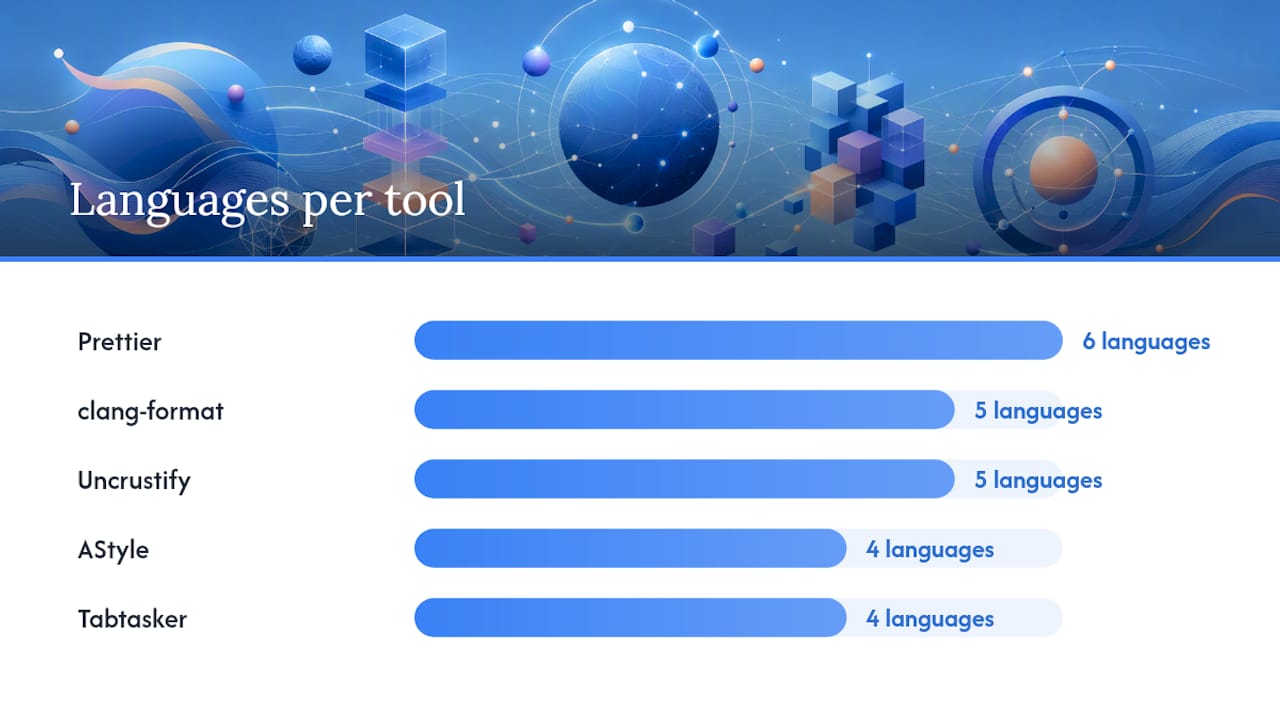
Languages: JavaScript, TypeScript, CSS, HTML, JSON, Markdown, GraphQL, YAML
npm install -g prettier
prettier --write "src/**/*.{js,ts,css}"
Prettier is opinionated by design. Its configuration surface is intentionally narrow — you pick a few options (print width, tab width, semicolons) and the formatter decides the rest. That rigidity is a feature for teams that want consistent output without arguing about style. Prettier draws a very large number of weekly downloads, indicating strong community support and numerous editor plugins., which means community support and editor plugins are abundant. The --write flag modifies files in place; the --check flag is what you want in CI.
Platform: Windows, macOS, Linux. Requires Node.js locally; no network call at runtime.
clang-format
Languages: C, C++, Objective-C, Java, JavaScript, Protobuf
# macOS via Homebrew
brew install clang-format
clang-format -i --style=Google myfile.cpp
The clang-format documentation covers pre-built binaries for all three major platforms, so you can drop the binary into a repo and run it without installing LLVM. Style selection is where clang-format shines: you can use a named profile (LLVM, Google, Chromium, Mozilla, WebKit) or write a .clang-format file with granular per-option overrides. That makes it one of the most configurable formatters in the C/C++ space, while still being fast enough for pre-commit use on large codebases.
Platform: Windows, macOS, Linux. Native binary; no runtime dependency.
Uncrustify
Languages: C, C++, C#, D, Java, Objective-C, Vala
# Ubuntu/Debian
sudo apt install uncrustify
uncrustify -c project.cfg --replace src/main.c
Uncrustify is the formatter you reach for when a project has a deeply specific house style that no named profile covers. It exposes hundreds of configuration options, which is both its strength and its learning curve. For teams maintaining legacy C codebases with unusual indentation rules or brace placement conventions, that depth is worth the setup time. The binary is self-contained and suitable for CI pipelines that cannot reach external package registries.
Platform: Windows, macOS, Linux. Available as a native binary or buildable from source.
AStyle (Artistic Style)
Languages: C, C++, C#, Java
# Download binary from astyle.sourceforge.net
astyle --style=allman --indent=spaces=4 MyFile.java
AStyle predates most modern formatters and remains a practical choice for C# and mixed C/Java projects where clang-format's Java support feels secondary. The awesome-code-formatters curated list notes it alongside clang-format and Uncrustify as one of the established offline-capable C-family tools. The native binary is small, portable, and runs on all three platforms without a runtime.
Platform: Windows, macOS, Linux. Standalone binary.
black
Languages: Python
pip install black
black src/
Black calls itself "the uncompromising code formatter," and it means it. You get almost no configuration options. That's the point. Black's opinionated approach eliminates style debates on Python teams and produces deterministic output, which matters for reproducible builds. If your project needs linting alongside formatting, consider Ruff, which consolidates both into a single fast Rust binary and reduces the dependency surface for offline installs and pre-commit hooks.
Platform: Windows, macOS, Linux. Installs via pip; no network call at runtime.
Pro Tip: Run black --check src/ in CI to catch unformatted files without modifying them, and black src/ locally to fix them. This two-command pattern keeps CI fast and local dev frictionless.
yapf
Languages: Python
pip install yapf
yapf -i --style=pep8 myfile.py
Where black refuses to negotiate, yapf gives you control. You can target PEP 8, Google style, or a custom .style.yapf file. That flexibility makes it the better fit for Python projects with an existing style guide that doesn't map cleanly to black's output. The tradeoff is that "configurable" also means "more decisions to make," so new projects without a legacy style constraint are usually better served by black.
Platform: Windows, macOS, Linux. Pure Python; installs via pip.
google-java-format
Languages: Java
# Download the JAR from GitHub releases
java -jar google-java-format-1.x.x-all-deps.jar --replace *.java
google-java-format enforces Google's Java style guide without any configuration. The portable JAR is the key offline advantage: download it once, commit it to your repo or a shared artifact store, and run it anywhere that has a JVM. No Maven Central access required at runtime. The tradeoff is that you accept Google's style completely — there are no knobs to turn.
Platform: Windows, macOS, Linux. Requires a local JVM; no network call at runtime.
jfmt
Languages: Java
# Using the native binary (GraalVM native image)
jfmt format src/main/java/
jfmt is a newer entry in the Java formatting space that offers something google-java-format doesn't: a GraalVM native binary. That means no JVM startup overhead and no Java runtime dependency, which matters in CI environments where you want fast, self-contained tooling. The JAR option is also available for environments where native binaries aren't practical.
Platform: Windows, macOS, Linux. Native binary or portable JAR.
js-beautify
Languages: JavaScript, CSS, HTML
npm install -g js-beautify
js-beautify -r --indent-size 2 file.js
js-beautify is the configurable counterpart to Prettier in the JavaScript space. Where Prettier enforces its own style, js-beautify lets you define indentation, brace style, and line endings through a .jsbeautifyrc file. It's a practical choice for legacy JS projects where Prettier's output would require too many manual overrides. The -r flag rewrites files in place.
Platform: Windows, macOS, Linux. Requires Node.js; no network call at runtime.
Tabtasker
Languages: JSON, Markdown, CSV, plain text
Tabtasker's developer tools suite runs entirely in your browser with no file uploads and no account required. Open the tool, paste or load your file locally, and the formatting happens client-side. For quick one-off tasks — cleaning up a JSON config, tidying a Markdown doc before a commit — it's faster than spinning up a CLI. The privacy-first approach means your source code never leaves your machine, which matters when you're working with proprietary or sensitive files.
Platform: Any modern browser, any OS. No install required.
| Tool | Languages | Install method | Opinionated? | CI-friendly | License |
|---|---|---|---|---|---|
| Prettier | JS/TS/CSS/HTML/JSON/MD | npm | Yes | Yes | MIT |
| clang-format | C/C++/ObjC/Java/Proto | Native binary | Configurable | Yes | Apache 2.0 |
| Uncrustify | C/C++/C#/Java/D | Binary/source | Highly configurable | Yes | GPL |
| AStyle | C/C++/C#/Java | Native binary | Configurable | Yes | MIT |
| black | Python | pip | Yes | Yes | MIT |
| yapf | Python | pip | Configurable | Yes | Apache 2.0 |
| google-java-format | Java | JAR | Yes | Yes | Apache 2.0 |
| jfmt | Java | Native binary/JAR | Yes | Yes | Apache 2.0 |
| js-beautify | JS/CSS/HTML | npm | Configurable | Yes | MIT |
| Tabtasker | JSON/MD/CSV/text | Browser (no install) | No | No | Free to use |
How to wire offline formatters into your editor and git hooks
Running a formatter manually is fine for one-off tasks. Automating it is what actually keeps a codebase consistent.
Editor integration
Most formatters work through a local binary that your editor calls on save. In VS Code, the pattern is the same regardless of which formatter you use: install the editor extension, then point it at your local binary rather than letting it download one.
For Prettier in VS Code, add this to your settings.json:
{
  "prettier.prettierPath": "./node_modules/.bin/prettier",
  "editor.formatOnSave": true
}
For clang-format, the xaver.clang-format extension reads your .clang-format file and calls the system binary. Set "clang-format.executable" to the full path of your local binary if the extension doesn't find it automatically.
For black, the ms-python.black-formatter extension has a "black-formatter.path" setting that accepts an absolute path to your virtual environment's black binary.
Pre-commit hooks
Pre-commit hooks catch unformatted code before it reaches the repository. The pre-commit framework is the cleanest way to manage them, but a simple shell hook works too.
Using the pre-commit framework (.pre-commit-config.yaml):
repos:
  - [repo: https://github.com/psf/black](https://github.com/rishirdua/awesome-code-formatters)
    rev: 24.3.0
    hooks:
      - id: black
    rev: v3.1.0
    hooks:
      - id: prettier
Using a plain shell hook (.git/hooks/pre-commit):
#!/bin/sh
prettier --write --check "src/**/*.js" || exit 1
black --check src/ || exit 1
The || exit 1 pattern aborts the commit if the formatter finds unformatted files. Pair it with a local-only install (no network access at hook runtime) by pre-installing all dependencies before going offline.
Pro Tip: In development containers (Docker or devcontainer), bake the formatter binaries into the image at build time. That way, every developer gets the same version without a network call, and the container works identically in air-gapped CI.
How to pick the right offline formatter for your project
The choice usually comes down to three questions: what language are you formatting, how much control do you need over the output style, and how fast does it need to run in CI?
Language coverage first. Most formatters are language-specific. Prettier covers the JS/TS/CSS/HTML/JSON/Markdown surface well. Black and yapf own Python. clang-format and Uncrustify handle C/C++ and related languages. For Java, google-java-format and jfmt are the two cleanest offline options.
Opinionated vs. configurable. Opinionated formatters (Prettier, black, google-java-format, jfmt) make sense for new projects or teams that want to stop arguing about style. Configurable formatters (clang-format, Uncrustify, yapf, js-beautify) make sense when you're inheriting a codebase with an established style that doesn't match any named profile. The clang-format style options documentation is a good example of how deep that configurability can go.
Speed in CI. For Python projects, Ruff's combined linting and formatting binary is worth evaluating alongside black, particularly if CI time is a constraint. For JS/TS, Prettier at ~45 million weekly downloads has the broadest plugin and editor support, but Biome is growing quickly for teams that want a single fast binary.
Quick scenario map:
- New JS/TS project: Prettier or Biome
- Python project: black (opinionated) or yapf (configurable); Ruff if you want linting too
- C/C++ project: clang-format for standard style profiles; Uncrustify for custom house style
- Java project: google-java-format (JAR, no JVM startup overhead concern) or jfmt (native binary, no JVM required)
- Legacy JS with custom style: js-beautify with a
.jsbeautifyrc - Quick JSON/Markdown cleanup: Tabtasker, no install needed
What to check before going fully air-gapped
Offline use is straightforward when you plan for it. The problems show up when you assume a tool will work offline and discover at 2 AM that it tries to fetch a plugin at runtime.
Pre-flight checklist:
- Download all binaries and their dependencies before disconnecting. For npm-based tools, run
npm installwhile online and commitnode_modulesor usenpm packto create a local tarball. - Prefer native binaries (clang-format, AStyle, jfmt's GraalVM build) over interpreted tools when the environment has no package manager access. Statically linked binaries have zero runtime dependencies.
- For JAR-based tools (google-java-format), verify you have a local JVM and that the JAR is in a path your CI runner can reach without a registry call.
- Verify checksums or GPG signatures on every binary you download. Vendor-signed binaries from official release pages are the safest option.
- Set up a local mirror for pip (
--index-url file:///path/to/local/mirror) or npm (--registry http://localhost:4873) if you need to install tools in an air-gapped CI environment repeatedly. - For browser-based tools, client-side processing via WebAssembly means the formatter runs inside the browser tab with no outbound network requests, which is effectively offline for quick tasks.
Pro Tip: Pin every formatter to an exact version in your pre-commit config and lock files. When you can temporarily connect for updates, verify the new binary's checksum against the official release before deploying it to air-gapped systems.
License compliance is worth a quick check too. Most tools here are MIT or Apache 2.0, which are permissive. Uncrustify is GPL, which has implications if you're distributing a product that bundles it.
Why Tabtasker fits into a local formatting workflow
Tabtasker isn't a replacement for clang-format or black in a CI pipeline. It's the tool you reach for when you need to clean up a file quickly, privately, and without installing anything.
The practical use cases are specific:
- JSON config cleanup — before committing, when you don't have a project formatter configured for JSON yet
- Markdown tidying for documentation files, using Tabtasker's offline Markdown editor directly in your browser
- CSV formatting for data files that aren't part of a code project, via the local CSV editor
The honest limitation: Tabtasker doesn't format Python, Java, or C++ source files, and it doesn't integrate with git hooks or CI. For those workflows, the CLI tools above are the right answer. Tabtasker fills the gap for text-adjacent files and one-off cleanup tasks where spinning up a CLI would take longer than the task itself.
To use it: open Tabtasker's developer tools, select the relevant formatter (JSON, Markdown, or text), paste or open your file locally, and run the formatter. No account, no upload, no waiting.
Key Takeaways
The strongest offline formatter for any project is the one that matches your language, runs without a network call, and fits your CI pipeline without extra configuration.
| Point | Details |
|---|---|
| Match tool to language | Prettier for JS/TS, black or yapf for Python, clang-format or Uncrustify for C/C++, google-java-format or jfmt for Java. |
| Opinionated saves time | Choose black, Prettier, or google-java-format for new projects to eliminate style debates from day one. |
| Native binaries for air-gapped CI | Prefer statically linked or GraalVM native binaries (clang-format, jfmt, AStyle) when the environment has no package manager access. |
| Pre-commit hooks enforce consistency | Wire your chosen formatter into a pre-commit hook or the pre-commit framework so unformatted code never reaches the repository. |
| Tabtasker for quick private tasks | Use Tabtasker's client-side tools for JSON, Markdown, and CSV formatting when you need speed and privacy without a CLI install. |
The case for keeping your formatter local
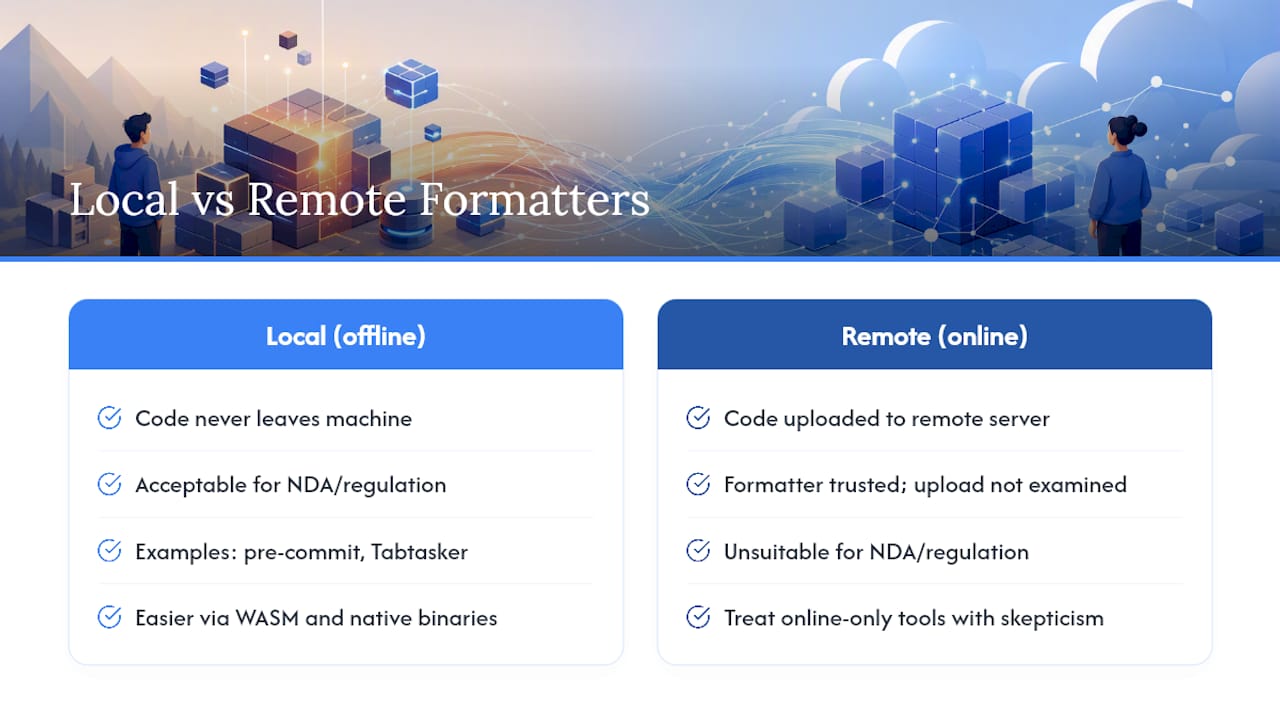
There's a pattern worth noticing in how developers treat formatting tools. They'll spend hours configuring a CI pipeline to enforce style, then casually paste sensitive source code into an online formatter to fix a quick issue. The formatter is trusted; the upload isn't examined.
That gap is where offline tooling earns its place beyond just convenience. When your formatter runs locally, whether that's a native binary in a pre-commit hook or a client-side browser tool like Tabtasker, the code never leaves your machine. For proprietary code, regulated industries, or anything under NDA, that's not a nice-to-have. It's the only acceptable option.
The trend toward WebAssembly and native binaries for developer tooling is making this easier. Tools that once required a full language runtime are now distributable as single files. That shift means "offline-capable" is becoming the default for well-maintained formatters, not the exception. The smarter move is to treat online-only formatting tools with the same skepticism you'd apply to any service that processes your data on a remote server — because that's exactly what they are.
Tabtasker: format files locally without the setup overhead
If the CLI tools above are the right answer for your production pipeline, Tabtasker is the right answer for everything else. It handles JSON, Markdown, CSV, and plain text formatting entirely in your browser, with no file uploads, no account, and no install. Your files stay on your device from start to finish.
That matters more than it sounds. Pasting source code or config files into an online tool means trusting that service's data handling, its uptime, and its privacy policy. Tabtasker's client-side model removes that trust requirement entirely. Open the Markdown editor or the full offline tools suite, load your file, and format it locally. No sign-up, no waiting, no questions about where your data went.
Useful sources and official docs
The links below are the authoritative starting points for downloads, configuration references, and deeper reading on each tool covered.
| Resource | What it covers |
|---|---|
| ClangFormat documentation | Pre-built binaries, language coverage, and CLI usage for clang-format |
| ClangFormat style options | Full reference for .clang-format configuration options |
| Uncrustify | Source downloads, configuration guide, and C-family language support |
| jfmt on GitHub | Native binary builds, JAR releases, and CLI documentation for jfmt |
| awesome-code-formatters | Curated list of offline-capable formatters across languages with links |
| GNU Indent | Standalone C/C++ reformatter for Unix environments |
| PkgPulse: Best Code Formatting Tools | Ecosystem overview with download stats for JS/TS formatters |
| Python Code Quality: Black, Flake8, and Ruff | Black vs. Ruff tradeoffs and offline binary considerations for Python |
| Best Free Code Formatters Online | Analysis of client-side vs. server-side formatting and privacy implications |