 TabTasker
TL;DR:
Automated batch PDF text extraction enables efficient processing of large document corpora for research purposes.
Using classify-then-route workflows, structured output formats, and validation improves data quality and processing speed.
Batch PDF text extraction is the process of automatically converting multiple PDF files into machine-readable text or structured data in a single automated run, and it is the foundation of any serious research data pipeline. For researchers managing hundreds or thousands of documents, manual copying is not a method. It is a bottleneck. Tools like Apify PDF Extractor, pdf-inspector, and Text Peeler now make bulk PDF text extraction accessible without specialized programming knowledge, while open-source libraries give technical teams full control over concurrency, OCR routing, and output formatting. Whether your project involves systematic literature reviews, corpus linguistics, or large-scale policy analysis, the right automated PDF text extraction setup will determine how fast and how cleanly your data reaches analysis.
What tools are available for batch PDF text extraction?
The PDF text extraction tools market divides cleanly into two categories: cloud-based APIs and local processing libraries. Each serves a different research profile, and choosing the wrong one costs you either money or control.

Cloud APIs like Apify PDF Extractor handle the infrastructure for you. Cloud extraction APIs cost approximately $0.005 per PDF document, with concurrency settings ranging from 5 to 50 documents per run. For a 10,000-document corpus, that is roughly $50, which is reasonable for most research budgets. The trade-off is that your files leave your machine, which matters when working with sensitive or embargoed data.
Local libraries like pdf-inspector take the opposite approach. They run entirely on your hardware, keeping data private by default. Local tools classify PDFs in 10 to 50 milliseconds and extract text-based documents in roughly 150 to 200 milliseconds, avoiding the 2 to 10 second latency that OCR adds. That speed difference compounds dramatically across thousands of files.
Here is a direct comparison of the major tools researchers use in 2026:
| Tool | Type | OCR Support | Output Formats | Best For |
|---|---|---|---|---|
| Apify PDF Extractor | Cloud API | Yes | JSON, CSV, Excel, XML | Large batches, minimal setup |
| pdf-inspector | Local library | Detect only | JSON, text | Fast classification, privacy |
| batch-ocr | Local CLI | Yes | Text, JSON | Mixed-format local batches |
| pdfmux | Local pipeline | Per-page routing | JSON | Mixed-format accuracy |
| Text Peeler | Desktop app | Yes | Text, CSV | Non-technical researchers |
Batch extractors export results in JSON, CSV, Excel, and XML, which means your output can feed directly into R, Python, or any standard data analysis environment without reformatting.
Pro Tip: If your collection mixes scanned and digital PDFs, do not default to a single cloud API for everything. Run pdf-inspector locally first to classify your files, then route only the scanned documents to a cloud OCR service. You will cut processing costs and time significantly.
How to set up and run a batch extraction workflow
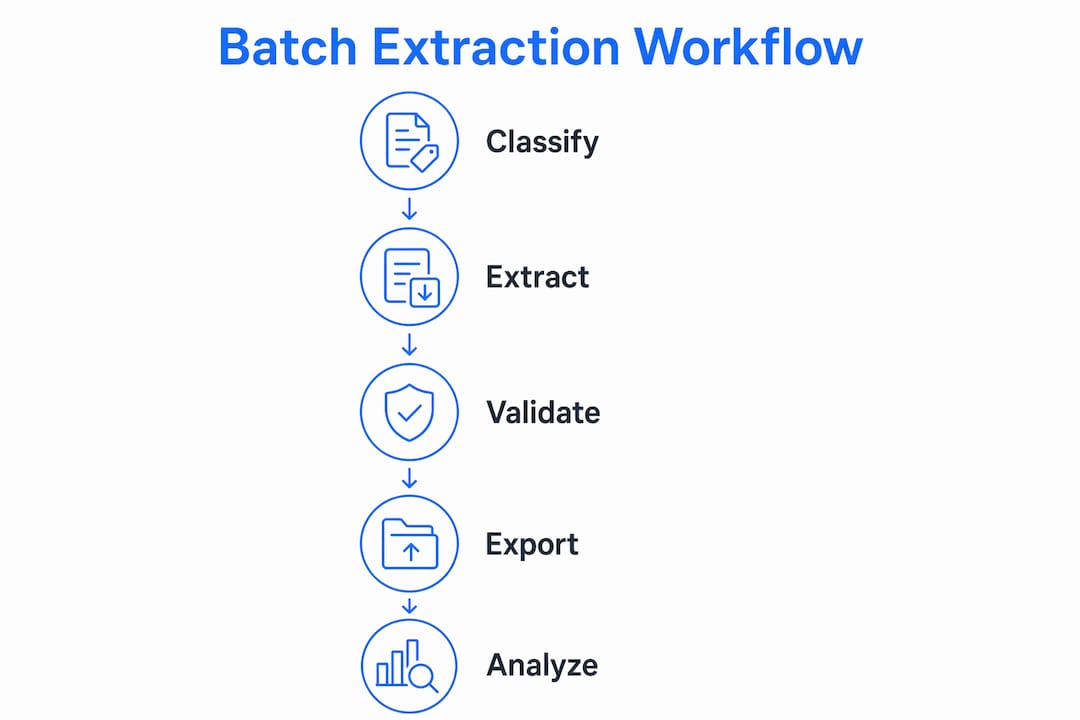
A well-structured batch workflow follows five distinct phases. Skipping any one of them introduces errors that compound as your corpus grows.
-
Organize your input directory. Place all PDFs in a structured folder hierarchy that mirrors your research categories. Tools that support recursive directory scanning will replicate this structure in the output, so your organized input becomes organized output automatically.
-
Classify your documents before processing. Run a classification pass to separate text-based PDFs from scanned image-only files. Roughly 54% of academic PDFs are text-based and extractable locally in under 200 milliseconds without OCR. Sending all of them through OCR wastes compute and time.
-
Configure concurrency and timeouts. For cloud APIs, set concurrency between 5 and 20 for most research workloads. Higher concurrency speeds processing but increases the chance of timeout errors on large or complex documents. For local tools, match thread count to your CPU core count.
-
Run extraction with per-page OCR routing. Rather than applying OCR to entire documents, configure your pipeline to make routing decisions at the page level. A single PDF might contain 40 digital pages and 3 scanned inserts. Page-level routing processes the 40 pages locally in milliseconds and sends only the 3 scanned pages to OCR.
-
Validate and review outputs. Check extracted files for blank pages, truncated text, and broken table structures before moving to analysis. Advanced batch extractors mirror input folder hierarchy and generate error logs and batch summaries, giving you a clear record of what succeeded and what needs reprocessing.
The table below maps each phase to the tool or method that handles it best:
| Workflow phase | Recommended tool or method |
|---|---|
| Classification | pdf-inspector |
| Local text extraction | pdf-inspector, pdfmux |
| OCR for scanned pages | Apify, batch-ocr |
| Output organization | batch-ocr (mirrored folders) |
| Validation | pdfmux, manual spot-check |
Pro Tip: Set a maximum timeout per document, not per batch. If one corrupted PDF hangs indefinitely, a per-document timeout kills that job and moves on. Without it, a single bad file can stall your entire overnight run.
Common challenges in large-scale PDF text analysis
Mixed-format batches are the most common source of extraction failure in research projects. A corpus assembled from multiple sources will almost always contain a mix of born-digital PDFs, scanned documents, partially scanned documents, and encrypted files. Treating all of them identically is where most pipelines break down.
Per-page OCR routing prevents the corrupted data that results from applying uniform processing to heterogeneous documents. When a pipeline assumes every page in a PDF is either digital or scanned, it either misses text or produces garbled output on the pages it misread.
The most common issues you will encounter, and how to address them:
-
Scanned image-only PDFs with no text layer. These require OCR. Without it, your extractor returns an empty file. Identify them during classification and route them explicitly.
-
Encrypted or password-protected PDFs. Most tools will fail silently or return an error. Log these separately and handle them as a distinct sub-batch after obtaining access.
-
PDFs with embedded tables. Standard text extraction collapses table structure into a flat string. Use tools that support structured table extraction, like pdfmux or Apify with table detection enabled.
-
Corrupted files. Failed documents in batch pipelines are reported with error details but do not stop the whole batch. Confirm your tool handles this gracefully before running a large job.
Extraction processes should include automated validation of output quality, detecting blank pages or broken tables to prevent garbage-in, garbage-out problems. Skipping this step means your analysis is only as good as your worst extracted document.
Validation is not optional. Robust extraction pipelines include automated checks for blank pages and broken tables before the data reaches analysis. A 5% error rate across 10,000 documents means 500 corrupted records in your dataset.
Best practices for extracting structured, semantically useful data
Raw text extraction is the floor, not the ceiling. For researchers building AI pipelines, semantic search indexes, or retrieval-augmented generation (RAG) systems, plain text output discards information that was present in the original document.
Structured outputs with spatial metadata preserve heading levels, bounding boxes, and reading order, which are the signals that make downstream semantic analysis meaningful. A heading in a PDF is not just larger text. It is a hierarchical marker that tells your model where a section begins and what it contains. Losing that structure at extraction time means you cannot recover it later.
Open-source developers building PDF pipelines in 2026 consistently prioritize structured data extraction over plain text, specifically to support AI and semantic retrieval use cases. This is not a niche concern. It is the direction the field has moved.
Practical recommendations for structured extraction:
-
Export to JSON with spatial coordinates rather than plain text files. JSON preserves the document’s logical structure and allows downstream tools to reconstruct sections, headings, and paragraphs.
-
Capture bounding boxes at extraction time. Once you have discarded spatial metadata, you cannot reconstruct it from plain text. Capturing spatial metadata like bounding boxes at extraction time enables higher-quality semantic analysis and prevents permanent data loss.
-
Use Markdown output for human-readable structured text. Markdown preserves heading hierarchy and is directly compatible with most large language model input pipelines.
-
Extract tables and forms as separate structured objects. Embedding table data in running text destroys its structure. Tools like pdfmux and Apify support discrete table extraction into JSON arrays.
-
Preserve document-level metadata. Author, date, title, and keyword fields extracted from PDF metadata complement the text content and improve retrieval precision. Understanding PDF metadata management is worth the time before you build your pipeline.
Pro Tip: If you are building a RAG pipeline, chunk your extracted text by heading section rather than by fixed token count. Section-based chunking preserves semantic coherence and produces significantly better retrieval results than arbitrary splits.
For researchers who want to understand the OCR layer in more depth before configuring their pipeline, the PDF OCR fundamentals guide covers intelligent routing and classification in detail.
Key takeaways
Efficient bulk PDF text extraction requires a classify-then-route architecture, structured output formats, and automated validation to produce research-grade data at scale.
| Point | Details |
|---|---|
| Classify before extracting | Use pdf-inspector to separate text-based and scanned PDFs before routing to OCR. |
| Per-page OCR routing | Apply OCR only to pages that need it, reducing cost and processing time across large batches. |
| Structured output over plain text | Export JSON with spatial metadata to preserve heading hierarchy and support AI pipelines. |
| Validate every batch | Automated checks for blank pages and broken tables prevent corrupted data from reaching analysis. |
| Match tool to data sensitivity | Use local tools for sensitive research data; cloud APIs for speed when privacy is not a constraint. |
What I have learned from building extraction pipelines the hard way
The classify-then-route architecture is the single most underused insight in research PDF processing. Most researchers I have spoken with set up a cloud API, point it at their entire corpus, and let it run. That works until it does not. The first time a 500-document overnight job returns 80 blank files because half the corpus was scanned and the API was not configured for OCR, the cost of that shortcut becomes very clear.
The other mistake I see consistently is treating extraction as a one-time event rather than a pipeline stage. Your extraction configuration is a research instrument. It should be versioned, documented, and reproducible, just like your analysis code. If you cannot re-run your extraction with the same settings six months later, your methodology has a gap.
Structured output also matters more than most researchers realize until they try to build something on top of plain text. The moment you want to do anything beyond keyword search, flat text files become a liability. JSON with heading levels and bounding boxes is more work to set up, but it is the format you will wish you had from the start. The data exfiltration risks in AI systems are also worth understanding if your extraction pipeline feeds into any cloud-based AI tool, because the data you send upstream does not always stay where you expect it to.
If you are not paying for the product, you might be the product. That applies to extraction tools as much as anything else. Know what happens to your documents after they leave your machine.
— Teshub
Process your research documents privately with Tabtasker
Research workflows involve sensitive data, and the tools you use to handle that data carry real privacy implications. Tabtasker’s free offline document tools process everything directly in your browser, with no uploads, no accounts, and no server-side storage. Your files stay on your device throughout.

For researchers who need to handle documents, images, or audio files alongside their extraction workflows, Tabtasker’s private offline toolbox covers PDF editing, image processing, and file sharing without the data exposure that comes with most web-based tools. When your research data is sensitive, the question is not just which tool is fastest. It is which tool you can actually trust with your files.
FAQ
What is batch PDF text extraction?
Batch PDF text extraction is the automated conversion of multiple PDF files into text or structured data formats in a single processing run. It replaces manual copying and enables large-scale research PDF data extraction for analysis.
Which tool is best for bulk PDF text extraction?
The best tool depends on your data sensitivity and corpus composition. Apify PDF Extractor suits large cloud-based batches at approximately $0.005 per file, while pdf-inspector and pdfmux are better for private, local processing with intelligent OCR routing.
How do I handle scanned PDFs in a batch workflow?
Use a classify-then-route approach: run a classification pass to identify scanned documents, then apply OCR only to those files. Per-page routing further reduces unnecessary OCR on documents that mix digital and scanned pages.
What output format should researchers use for extracted text?
JSON with spatial metadata is the recommended format for research use cases involving AI pipelines or semantic search. Plain text is sufficient for basic keyword analysis but loses heading structure and table data.
How do I prevent errors from corrupting my entire batch?
Configure per-document timeouts and confirm your tool logs failed files without halting the batch. Automated validation checks for blank pages and broken tables should run after extraction, before the data enters your analysis pipeline.